RustClaw
轻量、极速、内存安全;随处部署、广泛适配
🌐 多语言支持:
轻量、极速、内存安全;随处部署、广泛适配
🌐 多语言支持:
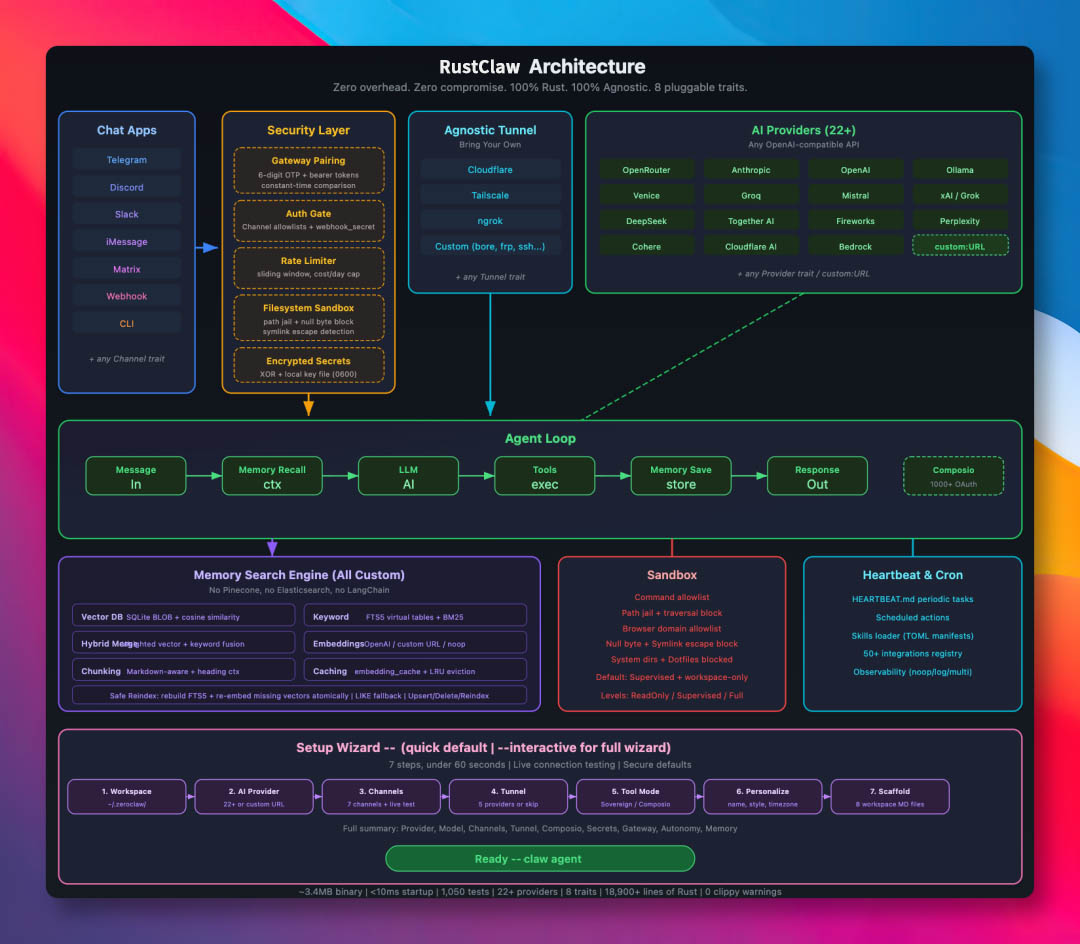
赤龙虾(RustClaw)是一个高性能、低资源占用、可组合的自主智能体运行时。RustClaw 是面向智能代理工作流的运行时操作系统 — 它抽象了模型、工具、记忆和执行层,使代理可以一次构建、随处运行。
Provider / Channel / Tool / Memory 可替换。
常见 CLI 与 status 工作流通常保持在几 MB 级内存范围。
面向低价板卡与小规格云主机设计,不依赖厚重运行时。
Rust 单二进制让常用命令与守护进程启动更接近“秒开”。
同一套二进制优先流程覆盖 ARM / x86 / RISC-V,组件可替换。
以下是本地快速基准对比(macOS arm64,2026 年 4 月),按 0.8GHz Edge CPU 进行归一化展示
| 指标 | RustClaw | OpenClaw | NanoBot | PicoClaw |
|---|---|---|---|---|
| 编程语言 | Rust | TypeScript | Python | Go |
| 内存占用 | < 5MB | > 1GB | > 100MB | < 10MB |
| 启动时间(0.8GHz 核) | < 10ms | > 500s | > 30s | < 1s |
| 二进制体积 | ~8.8 MB | ~28MB(dist) | N/A(脚本) | ~8MB |
| 成本 | 低至 $5 以上硬件 | Mac Mini $599 | Linux SBC ~$50 | Linux 板卡 $10 |
说明:Rustclaw 的数据来自 release 构建,并通过 /usr/bin/time -l 测得。OpenClaw 需要 Node.js 运行时环境,仅该运行时通常就会带来约 390MB 的额外内存占用;NanoBot 需要 Python 运行时环境。PicoClaw 与 rustclaw 为静态二进制。
基准数据会随代码与工具链变化,建议始终在你的目标环境自行复测:
cargo build --release
ls -lh target/release/rustclaw

/usr/bin/time -l target/release/rustclaw --help
/usr/bin/time -l target/release/rustclaw status
当前 README 的样例数据(macOS arm64,2026-02-18):
• Release 二进制:8.8M
• rustclaw --help:约 0.02s,峰值内存约 3.9MB
• rustclaw status:约 0.01s,峰值内存约 4.1MB
git clone https://github.com/RustClawBot/rustclaw.git
cd rustclaw
./install.sh
可选环境初始化:./install.sh --install-system-deps --install-rust(可能需要 sudo)。
详细说明见:docs/setup-guides/one-click-bootstrap.html。
建议在部署前确保目标机器已安装基础编译环境(gcc/g++、make、cmake 等), 对于 ARM 架构设备,需确认 Rust 工具链已正确配置交叉编译环境。
brew install rustclaw
git clone https://github.com/RustClawBot/rustclaw.git
cd rustclaw
cargo build --release --locked
cargo install --path . --force --locked
rustclaw onboard --api-key sk-... --provider openrouter
rustclaw onboard
rustclaw agent -m "Hello, rustclaw!"
rustclaw gateway
# 默认: 127.0.0.1:42617
rustclaw daemon
赤龙虾现已支持基于订阅的原生鉴权配置(多账号、静态加密存储)
~/.rustclaw/auth-profiles.json
~/.rustclaw/.secret_key
<provider>:<profile_name>
例:openai-codex:work
# 推荐用于服务器/无显示器环境
rustclaw auth login --provider openai-codex --device-code

# 浏览器/回调流程,支持粘贴回退
rustclaw auth login --provider openai-codex --profile default
rustclaw auth paste-redirect --provider openai-codex --profile default

# 检查 / 刷新 / 切换 profile
rustclaw auth status
rustclaw auth refresh --provider openai-codex --profile default
rustclaw auth use --provider openai-codex --profile work
# 粘贴订阅/setup token(Authorization header 模式)
rustclaw auth paste-token --provider anthropic --profile default --auth-kind authorization

# 别名命令
rustclaw auth setup-token --provider anthropic --profile default
rustclaw agent --provider openai-codex -m "hello"
rustclaw agent --provider openai-codex --auth-profile openai-codex:work -m "hello"

# Anthropic 同时支持 API key 和 auth token 环境变量:
# ANTHROPIC_AUTH_TOKEN, ANTHROPIC_OAUTH_TOKEN, ANTHROPIC_API_KEY
rustclaw agent --provider anthropic -m "hello"
3 contributors shipped features, fixes, and improvements in this release cycle:
Thank you to everyone who opened issues, reviewed PRs, translated docs, and helped test. Every contribution matters. 🦀
如果你需要完整实现细节(架构图、全部命令、完整 API、开发流程), 请直接阅读英文RustClaw.org官网,快速部署启动指南: 立即领养部署您的专属龙虾,进入全民Agent生产力时代!